Posts

Replicated/Remediated Object: Progress 1

Image
To start this project I looked at various artist for inspiration. I looked towards one of my favorite sources of inspiration Rachel Boxnboin. I usual reach for examples of her work as I appreciate her se of texture and colour in her work. I originally discovered and fell in love with this artist for her practice of creating household forms with ceramics through fabric moulds, which I think is highly innovative and offers a unique sense of movement to her work.   Rachel Boxnboin Other artists I looked at was Brooks Olivers use of flowing forms, Ikuko Iwamoto's undulating and rhythmic vases, and Kieu Tran's abstract line-like sculptures that often resemble human forms.    Brooks Oliver   Ikuko Iwamoto Kieu Tran  For my own creation I developed forms based off of various levels of influence from each of these artists, as well as mu own preferences. The majority of my ideas use very fluid forms and paths. Below is a complete over-view of the ideation phase in R...

Algorithmic Surface Modelling and Animation

Image
                                                  After completing the reading for this week I had a much better understanding of paneling and the in-class tutorials from this week. For my first attempt I wanted to panel a star shape across the lofted form I created for my first definition assignment. However this created numerous challenges and would not panel the shape. After a while of trying to fix this issue, I decided to take a new route.   (yeah I have no idea what happened here)  I decided to try a simpler option and opted for a dome shape with squiggly blue lines over top. This option turned out much better and I was able to animate it. I still thought I could go further as this was very basic.  In the end I ended up with a star shape that conformed to a sphere. For the animation aspect I rotated the paneled shape and the sphere. I wan...

Mile Stone Project 1: Stacked Slice

Image
 This week I focused on laser cutting my sliced stack model. I chose to use wood for my model instead of an alternative such as acrylic because I enjoy the texture. During the 210 laser cut pattern project I found that I enjoyed the wood grain texture, and dark scorch marks from the laser.  Left side  Front View  Top View  Right Side  I really like how my final stacked sliced model came out. I like the stepped or stair-like curves in the model. I think if I were to improve this model in any way I might try and make my overall form more round as the laser cut model became more oblong ( I think this is an issue with the depth of my material in my algorithm) In the future I would also like to experiment with different axis of slicing, and potentially painting the layers to create an ombre, or colour shifting effect. 

Mile Stone Project 1Stacked Slice: Progress

Image
I started this week by branching off of the in-class demonstrations. I enjoyed the loft demo and sweep demo the most so I decided to continue to work on those. I created to forms from those class demos that I then used with the contour parameter to produce the two works below   ( I struggled with the extrusion on this one but was able to get the contour lines, I think it is an issue with the geometry that I created in Rhino. I am still working to fix this issue with planar surface, etc. ) After creating these two forms that were direct interpretations of the class demo's I decided to explore what I could create using the techniques learned in the demo's The first is a bowl like structure where I used loft to control the inner depth. The second is a squared statue like structure that I created in Rhino, and applied the contour slicing to. ( I think if I continue with this square option I want to explore using different vectors to change the direction of the contours to create a ...

OBDF 310: Animation Struggles and Triumphs.

Image
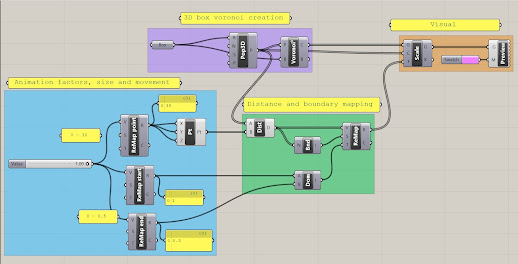
 This weekly assignment was a doozy. I knew what I wanted to create this week for my animation assignment, however upon opening grasshopper I realized I had no idea how to accomplish this, or how to word what I wanted to create. I spent lots of time this week exploring the various sections of parameters to find what I needed. For my animation I wanted to use the 3D populate parameter to create a cube where the inner forms would change.  After lots of exploring in grasshopper, and numerous google searches I discovered I needed to use a Voronoi parameter to create my desired pattern. After I found this parameter and used it alongside my box and 3D populate parameter, it just became a project of understanding what inputs I needed to have control over the cell-like shapes. My final algorithmic sequence looked like this.  The purple group is where I started my design, I used a box parameter to fulfil the boundary of my Voronoi. I also connected the box to the region input of t...

OBDF 310: My First Defintion!

Image
 Back at it again with Rhino, but this time with the addition of grasshopper! After these first few tutorials and exploring grasshopper I can tell that there is going to be a steep learning curve, but I am so excited to work with grasshopper. The tutorials were super engaging and definitely made me want to explore other tools in the program. I think my biggest wow moment with grasshopper so far as been how quickly  you can change the appearance of geometry or replace the logic of an entire section. I found most of the tutorials easy to follow and learned lots about how the interface works and how t find tools and understand data. The only area that I had issues with was the assigning colours. My definition that I made while following the tutorials did not show the gradient through the curves, rather they were all the same colour, so I will continue to look at that and see where I went wrong.  Tutorial Screenshots  Screenshot of most of the created parameters  Sc...